

Skip to navigation Skip to main content

Focused on WordPress foreign trade website building | Foreign trade site hosting and maintenance | Contact phone:18676522246 (Same number on WeChat)

Focused on WordPress foreign trade website building | Foreign trade site hosting and maintenance | Contact phone:18676522246 (Same number on WeChat)

  • Home
  • WordPress Foreign Trade Website Building Service
    • B2B Foreign Trade Website Development
    • B2C e-commerce website development
    • WordPress Website Hosting Maintenance
    • SaaS Website to WordPress
  • Works
  • Foreign Trade Website Building Knowledge Center
    • WordPress Theme Tutorial
    • Foreign trade website SEO
    • Foreign trade website building
  • About Us
    • Website Building Packages
  • Contact Us
  • English
    • 香港中文
    • 繁體中文
    • 简体中文
xiaohongshu
Website Consultation
Menu

How to view the Sitemap XML site map

Posted by Yi Jian Lao Hu
16.09.2026 On 15.05.2026

What is a Sitemap?

A Sitemap is an XML file that contains:
Website page links
Page update time
Page hierarchy structure
Common address:https://你的域名/sitemap.xml

Most WordPress SEO plugins automatically generate a Sitemap.
Common plugins:
Yoast SEO
SEOPress
All in One SEO
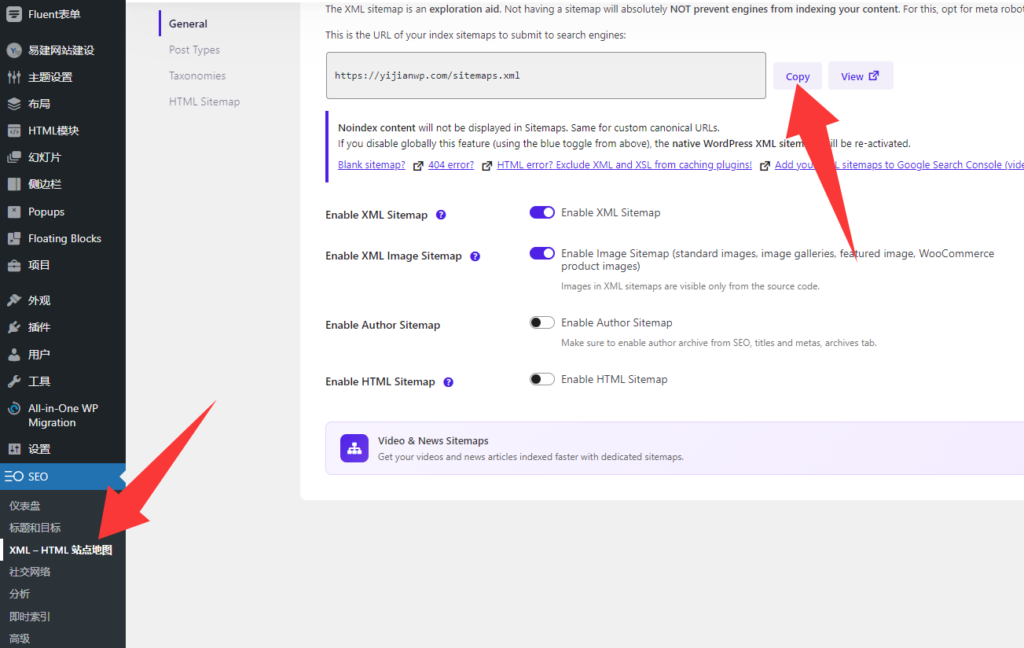

View Sitemap XML Site Map

SitemapXML, Website SEO, SEO Optimization, Google Indexing, Website Index, Foreign Trade Standalone Site, Technical SEO, Website Detection
Newer
How to submit a website Sitemap to Google Search Console?
Back to list
Older How to write SEO titles and descriptions: A complete guide with practical tips

Table of Contents

  • Foreign Trade B2B Website Product Category Page Optimization Guide
  • How to choose a reliable WordPress foreign trade website building company?
  • How to operate an independent foreign trade website for mechanical parts? 8 methods to increase Google traffic and overseas inquiries
  • What materials do customers need to prepare for foreign trade website building? A complete website building checklist
  • What to do if your foreign trade website gets no inquiries? Check these issues first

YiJian Website BuildingFocused on WordPress foreign trade website building, enterprise official website custom development, WooCommerce standalone site construction, and Google SEO optimization services.With 13 years of experience in the WordPress foreign trade website building field.

Quick Links

  • WordPress Foreign Trade Website Building Service
  • B2B Foreign Trade Website Development
  • B2C e-commerce website development
  • Foreign Trade Website Building Cases
  • Common Questions About Foreign Trade Website Building
  • Contact Us

Latest News

  • Foreign Trade B2B Website Product Category Page Optimization Guide
  • How to choose a reliable WordPress foreign trade website building company?
  • How to operate an independent foreign trade website for mechanical parts? 8 methods to increase Google traffic and overseas inquiries
  • What materials do customers need to prepare for foreign trade website building? A complete website building checklist
  • What to do if your foreign trade website gets no inquiries? Check these issues first

Get in Touch

  • Foshan, Guangdong. Online services for domestic and overseas foreign trade enterprises nationwide.
  • Mobile: 18676522246
WeCom

Scan the QR code to add WeChat

© 2026

Yijian Website Copyright All Rights Reserved - Corporate Website Customization - Foreign Trade Independent Site Construction - E-commerce Mall Development

  • Terms of Service
  • Disclaimer
  • Privacy Policy
  • Terms of Service
  • Disclaimer
  • Privacy Policy
WeCom

Add my WeCom to contact me

  • Home
  • WordPress Foreign Trade Website Building Service
    • B2B Foreign Trade Website Development
    • B2C e-commerce website development
    • WordPress Website Hosting Maintenance
    • SaaS Website to WordPress
  • Works
  • Foreign Trade Website Building Knowledge Center
    • WordPress Theme Tutorial
    • Foreign trade website SEO
    • Foreign trade website building
  • About Us
    • Website Building Packages
  • Contact Us
  • English
    • 香港中文
    • 繁體中文
    • 简体中文
English
简体中文 繁體中文 香港中文