
Customers often ask:
“The website is already built, why can't it be found on Google?”
In fact, a new website will not immediately appear in Google search results after launch. From Google discovering the website, crawling pages, to completing indexing, it usually takes some time. Understanding Google's indexing mechanism can help companies plan their website operations and SEO optimization more reasonably.
What is Google indexing?
Google indexing refers to the process where the Google search engine adds website pages to its own database.
Only after a page is indexed by Google does it have the opportunity to participate in keyword rankings and gain organic search traffic.
Special attention is needed:
Indexing does not equal ranking.
Even if a page has been indexed by Google, it does not mean users will necessarily find your website when searching for relevant keywords.
Click to learn how to check the number of indexed pages?
How long does it generally take for a new website to be indexed by Google?
Google has not given a fixed time frame.
Based on Yijian's experience:
SubmitGoogle Search ConsoleAfter that, it is usually discovered within a few days to a few weeks
Websites with solid SEO foundations may start getting indexed within 1-4 weeks
Websites with less content or lower quality may take several months
Some websites with technical issues may even remain unindexed for a long time
Therefore, if a new website is not indexed by Google a few days after launch, there is no need to worry too much.
What factors affect the speed of Google indexing?
Whether Google Search Console has been submitted
Google Search ConsoleIt is the official website management tool provided by Google.
After submitting the website, you can:
Submit Sitemap
View indexing status
Monitor crawl errors
Manually request page indexing
For new websites, submitting to Search Console is an important step to help Google quickly discover the website.
Click to view how to submit a website Sitemap to Google Search Console?
Website content quality
Google tends to prioritize indexing valuable original content.
If the website only has a few simple pages, such as:
Home
Product Page
Contact Us
Without detailed product introductions, case studies, or industry blogs, the indexing speed may be slower.
It is recommended to prepare at least the following when launching a new website:
Complete company introduction
Product detail pages
FAQ page
Industry blog articles
Rich website content can increase Google's enthusiasm for crawling and indexing.
Whether the website structure is reasonable
The website structure directly affects the crawling efficiency of Google's crawlers.
A good website structure should have:
Clear navigation menu
Reasonable category structure
SEO-friendly URLs
Comprehensive internal links
For example:
Correct URL:
example.com/industrial-doors
Not recommended URL:
example.com/page?id=123
Concise and clear URLs are easier for Google to understand and index
How to optimize website URLs? A complete guide to improving SEO rankings and user experienceThis article provides a detailed explanationhttps://yijianwp.com/how-to-optimize-website-url/
Whether the Sitemap has been properly submitted
A Sitemap helps Google quickly understand which pages on the website need to be crawled.
For WordPress websites, most SEO plugins automatically generate XML Sitemaps.
After submitting the Sitemap, Google can discover new pages more efficiently.
Click to view how to submit a website Sitemap to Google Search Console?

Website loading speed
If the website loads too slowly, Google's crawlers may reduce the crawling frequency.
Common reasons affecting speed include:
Images that are too large
Insufficient server performance
Too many plugins
Lack of caching optimization
Therefore, improving website performance not only benefits user experience but also aids indexing and ranking.
Whether external links are obtained
One way Google discovers new websites is through links on other websites.
If industry platforms, social media, or partner websites link to your site, Google can usually discover and crawl pages faster.
For new websites, it is appropriate to engage in:
Social media sharing
Business directory submissions
Publishing content on industry platforms
Helping Google find your website faster.
Why is the website still not indexed?
If the website has been online for over a month and still hasn't been indexed, it is recommended to check the following issues:
robots.txt blocks search engines
Some websites block search engine crawling during the testing phase.
If the restriction is not removed after launch, Google will be unable to access the website content.
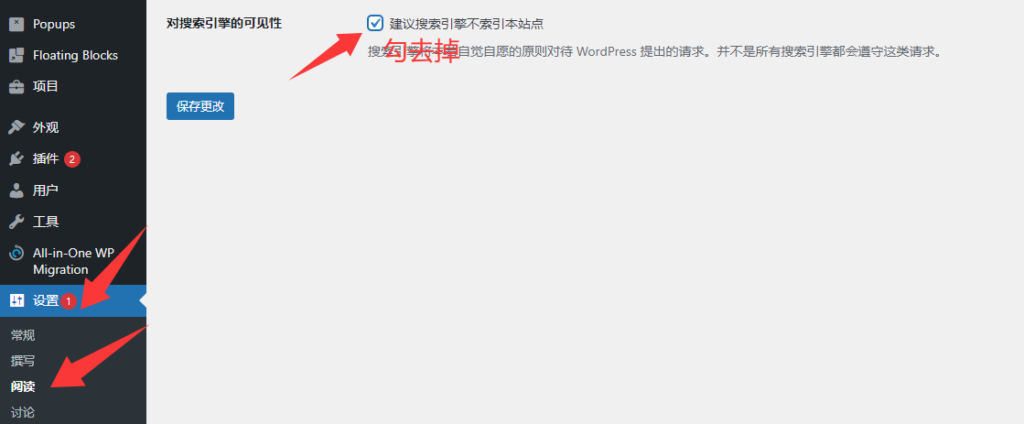
Page set to No Index
WordPress or SEO plugins may have a “No Index” setting.
If this option is enabled, Google will not index the corresponding pages.
Insufficient website content
Websites with only a few simple pages may be judged by Google as having low content value.
Technical errors on the website
For example:
Pages inaccessible
Numerous 404 errors
SSL certificate anomalies
Frequent server downtime
These issues all affect Google's crawling and indexing.
How to speed up Google indexing?
If you want a new website to be indexed by Google as soon as possible, you can take the following measures:
✅ Submit to Google Search Console
✅ Submit XML Sitemap
✅ Publish original blog content
✅ Optimize website structure and internal links
✅ Improve website loading speed
✅ Promote the website through social media
✅ Obtain high-quality external links
Although these methods do not guarantee immediate indexing, they can significantly improve the efficiency of Google discovering and crawling the website.
Latest Blog
- How to Create a High-Quality B2B Product Detail Page? A Comprehensive Analysis from H1, Product Features to Specification Tables

- SEO Optimization for Foreign Trade Websites: How to Correctly Use H1, H2, and H3 Heading Tags?
- What should be done if a website has no one to maintain and manage it? What exactly should daily maintenance involve?
- Website Image SEO Optimization Guide: How to name images? How to write Alt tags?
- What is keyword layout? Core techniques essential for foreign trade website SEO optimization