

When using WordPress to build a blog or corporate content website,Category managementis a very important but often overlooked task. A reasonable category structure can not only enhance the user reading experience but also directly affect the website's SEO performance and future content scalability.
This tutorial will systematically introduce the basic concepts, creation methods, management techniques, and common optimization suggestions for WordPress category management, helping you build a clear, efficient content structure that is conducive to search engine indexing.
What are WordPress blog categories?
In WordPress, categories are used to classify posts at amacro-level content grouping, with main functions including:
-
Systematically organizing content by topic
-
Helping visitors quickly find articles of interest
-
Providing a clear site structure for search engines
-
Serving as an important component of navigation menus, sidebars, and breadcrumb navigation
Compared to tags:
-
Categories are more like book chapters, with a hierarchical structure (parent and child categories can be set)
-
Tags are more like keyword indexes, without a hierarchical structure
How to create WordPress blog categories?
(1) Access the backend management
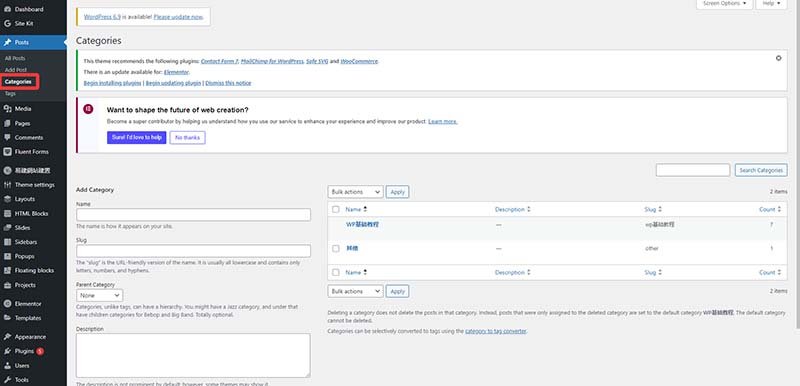
Log in to the WordPress backend → Click on “Posts” in the left menu → Select “Categories”
(2) Add a new category
On this page, you will see the following fields:
-
Name: The display name of the category, e.g., “Furniture”
-
Slug: used for URL English or pinyin of, for example furniture
-
Parent Category: Used to create a two-level or multi-level category structure
-
Description: Optional, used to fill in a brief description of the category (some themes display it)
(3) Assign categories to posts
Create or edit a post
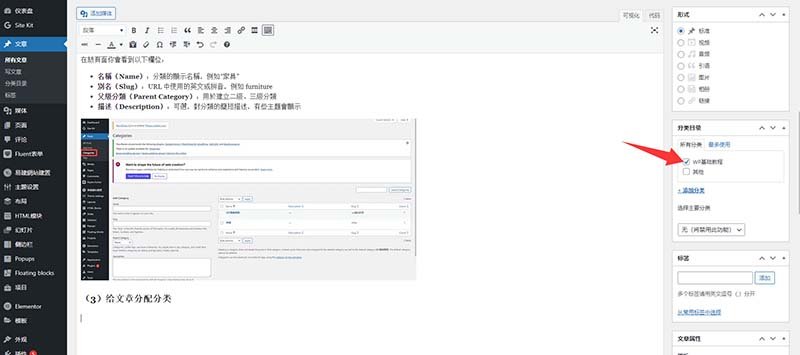
Find the “Categories” module in the right sidebar of the post editor:
- Check existing categories, or click “+ Add New Category” to create a new category
- A post can be assigned to multiple categories, but it is recommended to control the number and ensure clear thematic relevance between categories
This helps users understand content attribution more clearly and also aids search engines in better crawling and understanding the page structure.
SEO optimization
Each category in WordPress generates a unique URL and page, for example:https://你的域名.com/category/furniture/
You can use SEO plugins (such as Yoast SEO, SEOPress) to set Title 和 and Meta Descriptionfor category pages individually, thereby improving search engine performance.
Category optimization suggestions
-
Avoid having too many categories
Categories should remain concise and clear; it is not recommended to create a new category for each post -
Category names should be clear and easy to understand
Categories should prioritize user understanding, not just site structure design -
Reasonably arrange keywords
Category names can include keywords, but avoid keyword stuffing -
Optimize mobile experience
Multi-level categories (parent/child) should be easy to browse and click on mobile devices
Summary
Effective category management is one of the important foundations for a successful WordPress website. A reasonable category structure can not only improve user experience but also significantly enhance the site's SEO performance.
Using the methods introduced in this tutorial, you can systematically plan, create, and optimize the WordPress category system, making the website content clearer and more organized, convenient for user browsing and search engine crawling.
It is important to note that the category structure is not static. As website content continues to grow, regular checks and optimizations should be performed to ensure the category system always aligns with the site's development direction and user needs.