

Google cannot directly understand images like humans do; it relies onimage filenames, Alt tags, and page contentto determine what the image depicts.
Optimizing images for SEO not only benefits page rankings but also offers a chance for images to appear inIt can be seen in Google image search

How to optimize image filenames?
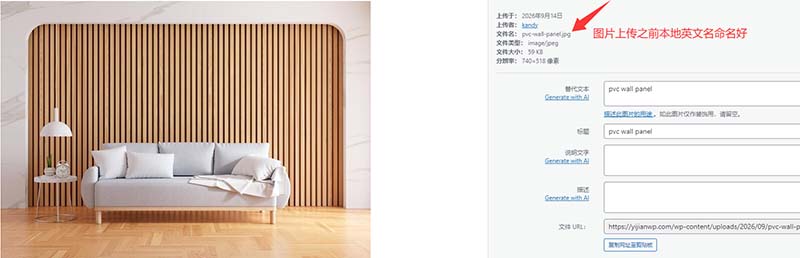
Image naming should be standardized. Before uploading images, do not use default file names, for example: ❌ IMG_001.jpg ❌ download.jpg, do not use these meaningless words
Name images in English locally before uploading; it is recommended to directly use product keywords as filenames, for example:
✅ pvc-wall-panel.jpg
✅ custom-cosmetic-bag.jpg
✅ led-flood-light.jpg
How to modify image Alt tags?
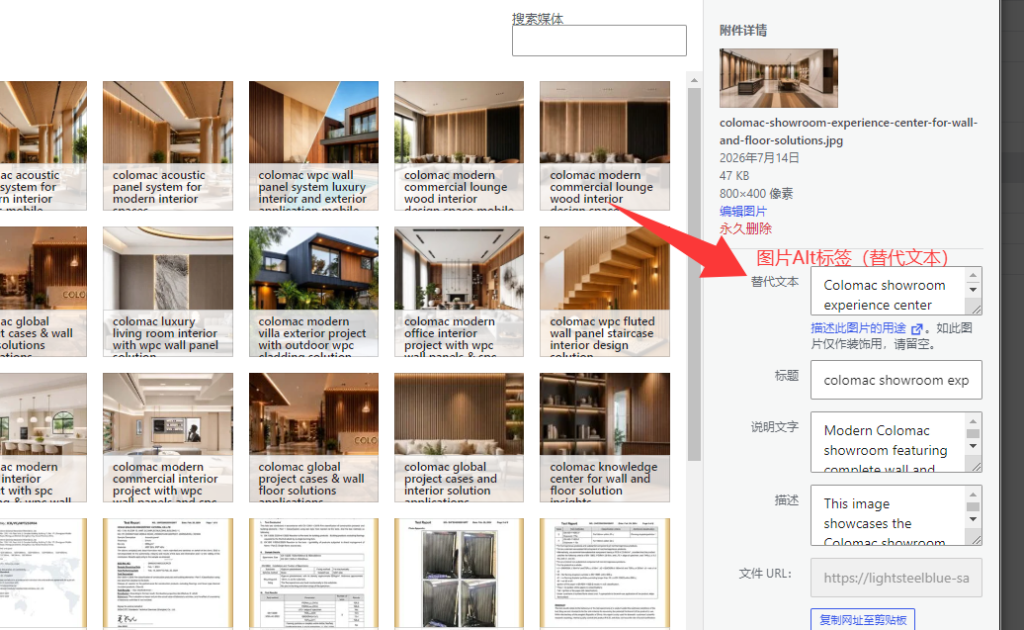
When you select an image, click on it; the alternative text below the image thumbnail on the right is where you fill in the image Alt tag. Google will recognize the Alt tag.
How to Write Alt Tags for Better Results?
✅ Accurately describe the image content and naturally incorporate keywords.
✅ Use different Alt tags for each image whenever possible, allowing images to cover more keywords.
✅ Ensure image content aligns with the current page theme to improve relevance.
✅ Avoid keyword stuffing or repeated use of keywords.
✅ Do not use meaningless terms, such as Image, Picture, Photo, etc.
IV. What other details should be noted for image SEO optimization?
In addition to image names and Alt tags, optimizing image quality and size is equally important
About product main images: Our product main images have a magnifying glass function, with a 1:1 square ratio. The size can be customized, and generally 800×800px is sufficient for display.
For images used elsewhere:For example, product description images on the detail page have no specified size or ratio, but it is recommended that all images have the same width.
Image compression processing, size controlled around 100K, recommended:http://www.tinypng.com/Compress online, then upload.
Before uploading images, do not use default file names. Name them in English locally, then upload to the website and optimize with Alt tags.